Creates SEO-focused content for ClassifyLanka.com promoting Sri Lankan businesses by developing clear, structured articles and directory updates that help you understand, navigate, and discover trusted services across Sri Lanka.
View Bio
O/L and A/L Exam Results: How to Check Results Mobile and Website
Published May 31, 2024 | Last Modified January 10, 2026
Find Sri Lanka exam results using the Department of Examinations (DoE) results portal or SMS method below.
A/L and O level examination results Release to Sri Lanka Examination Department official website https://www.doenets.lk. If the official Department of Examinations results website (doenets.lk) is slow due to high traffic, you can still retrieve the same exam result using:
your mobile operator’s SMS result service (short codes listed below).
the official DoE portal when it becomes responsive, or
අ.පො.ස. සාමාන්ය / උසස් පෙළ විභාග ප්රතිඵල – GCE Ordinary/ Advanced Level Results Department of Examinations
Key takeaways (Sri Lanka exam results):
Official results website: doenets.lk (Department of Examinations)
If the website is slow: use SMS short codes by operator (Dialog / Mobitel / Airtel / Hutch)
To request older result certificates: certificate.doenets.lk → “Request Certificates”
1. Official websites
Official Department of Examinations website (Sri Lanka exam results) Use the Department of Examinations (DoE) results portal to check G.C.E. O/L, G.C.E. A/L, and Grade 5 Scholarship results by exam year and Index Number.
2023 GCE (A/L) results out before next Monday
Commissioner General of Examinations
Click the button below to check your exam results.
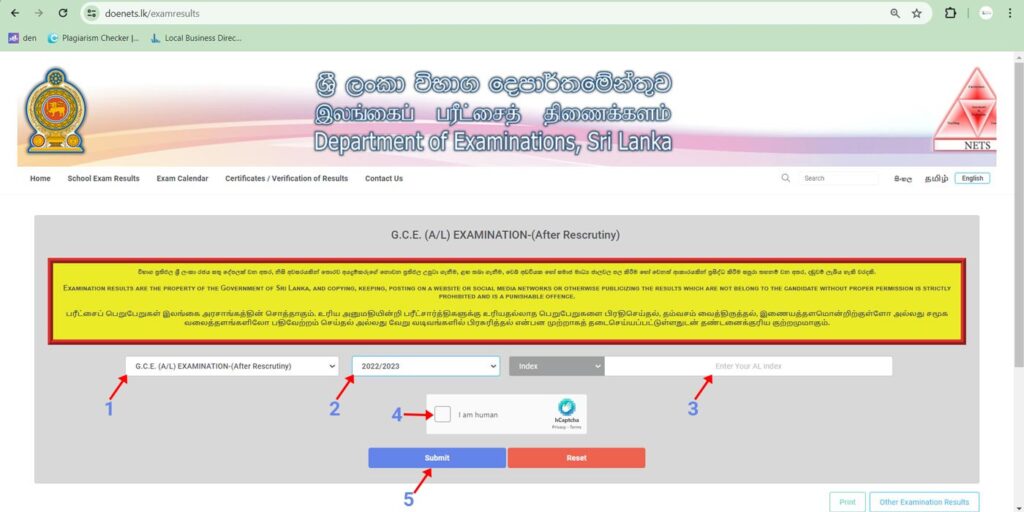
How to check Sri Lanka DoE exam results on the official website (doenets.lk) using a computer:
Choose the exam: G.C.E. (A/L), G.C.E. (O/L), or Grade 5 Scholarship
Select the exam year
Enter your Index Number
Complete the “I am human” verification
Click Submit to view the result
2. Check results via SMS (when the website is slow)
If the DoE results website is overloaded, you can retrieve your exam result using your mobile operator’s SMS short code by sending your Index Number.”
When doenets.lk is overloaded, you can request your exam result by SMS. Your mobile operator (Dialog, Mobitel, Airtel, or Hutch) will return the result associated with your Index Number from the Department of Examinations results system. Use the operator-specific short code below.
How To Using Mobitel SMS service For Check O/L and A/L Results
EXAMS <index number> and send to 8884 from your Dialog Mobile
How To Using Airtel SMS service For Check O/L and A/L Results
EXAMS <index number> and send to 7545 from your Dialog Mobile
How To Using Dialog SMS service For Check O/L and A/L Results
EXAMS <index number> and send to 7777 from your Dialog Mobile
How To Using Hutch SMS service For Check O/L and A/L Results
EXAMS <index number> and send to 8888 from your Dialog Mobile
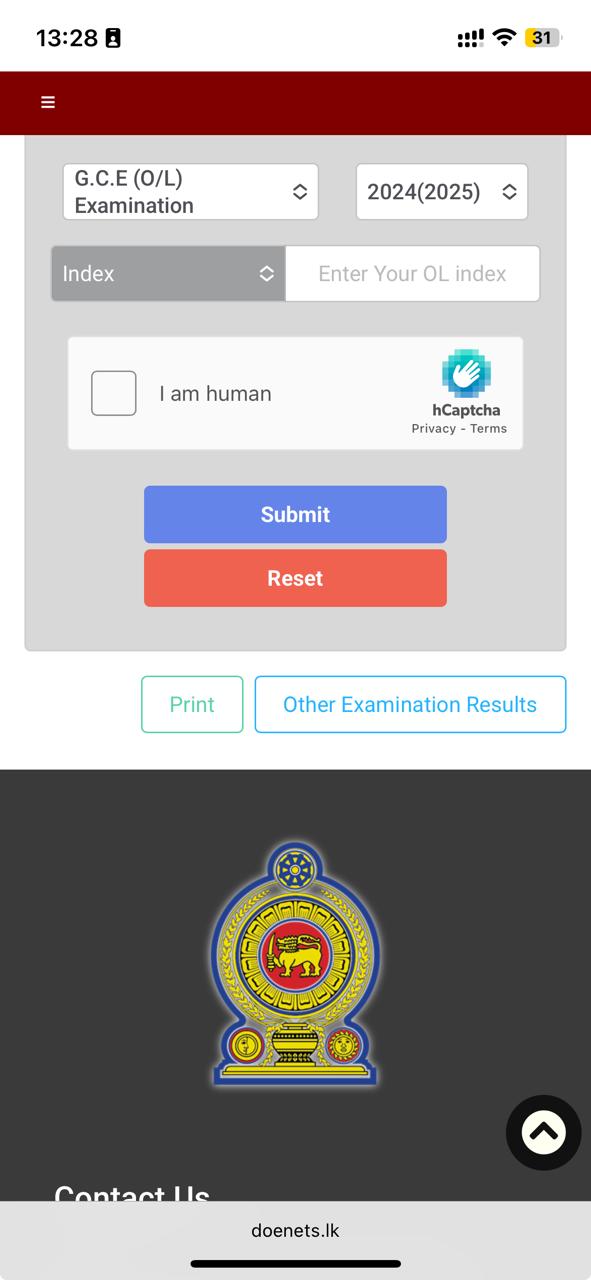
3. How to check Sri Lanka exam results on a mobile browser (DoE results portal):
Open doenets.lk in your phone’s browser
Enter your Index Number and submit to view your result
4. Request certificates for older exam results (DoE certificate portal)
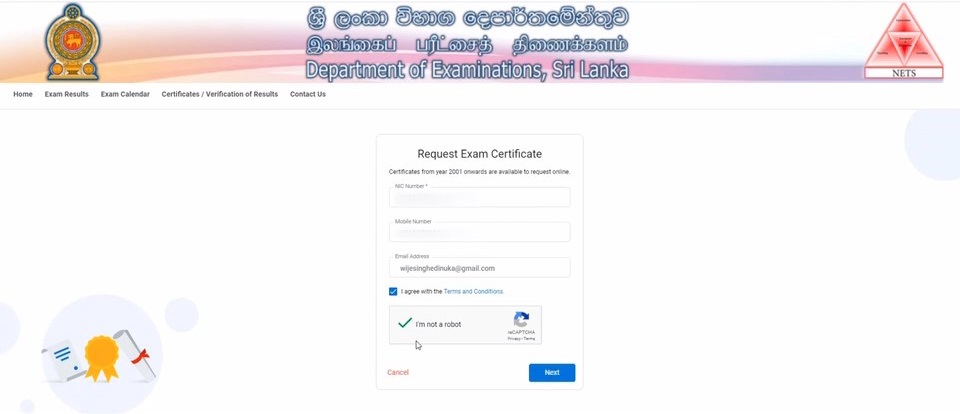
To obtain an official certificate for past G.C.E. O/L or G.C.E. A/L examinations, use certificate.doenets.lk. You will need your NIC, mobile number/email (for OTP verification), and your Index Number.
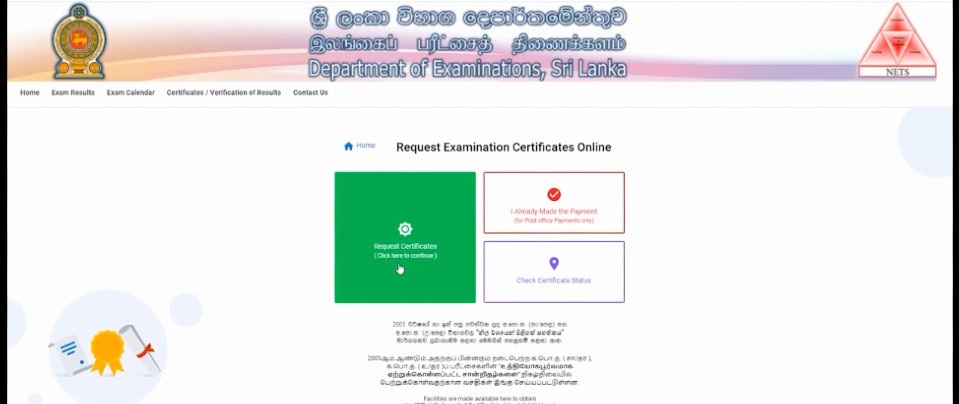
Open any browser
Enter address of site: https://certificate.doenets.lk/
Click “Request Certificates”
Fill in your details like NIC No, Mobile No and Email.
Once Fill your details, one-time passwords sent directly to a mobile phone/ email.
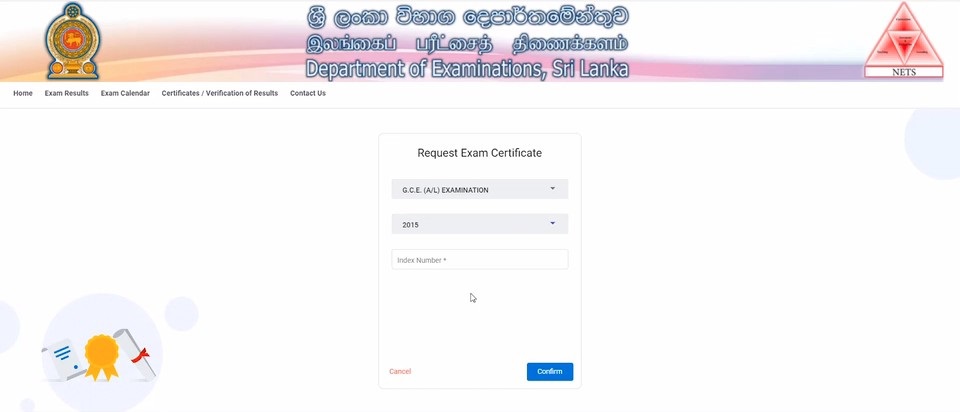
Fill the following options;
Examination (G.C.E A/L or G.C.E O/L Examination)
Year of Exam
Type Index No
Confirm
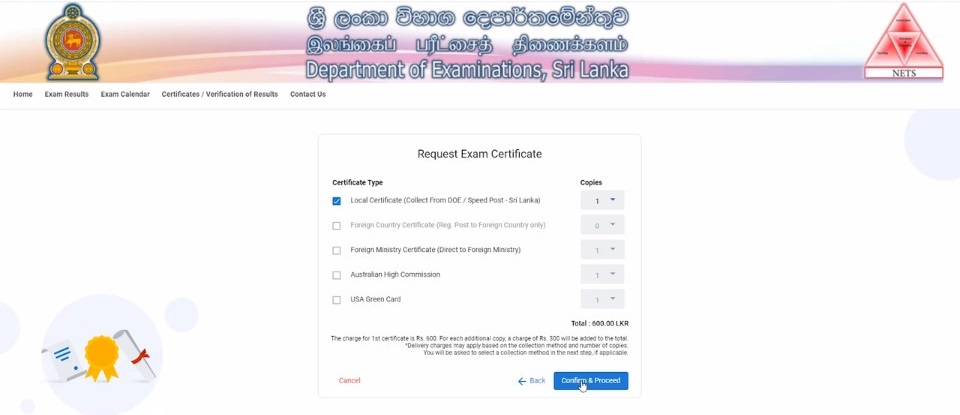
Verify your details and click Confirm
Select any following options Below and Confirm Proceed
Confirm Collection method and Proceed
Fill your delivery option if select collection method online (Speed post/ EMS/ Airmail)
Finally Click proceed Payment and get your exam certificate.
Classify Lanka Directory is a place to popularize your Business and generate leads in Sri Lanka. Get reviews and grow business reputation online. Your company profile can include contacts and description, products, photo gallery and your business location on the map.